What is G Code and M Code: Differences, Uses & Examples
17 min
- What Are G Codes and M Codes in CNC Programming?
- How Do G Codes and M Codes Work Together in a CNC Program?
- How Are G Codes and M Codes Generated and Verified?
- Common G Codes and M Codes Used in CNC Machining
- Do G Codes and M Codes Work the Same on Every CNC Machine?
- Basic G Code and M Code Mistakes That Affect Machining
- FAQs About G Codes and M Codes
Key Takeaways
- G codes define tool motion and machining modes, while M codes control auxiliary functions such as spindle operation, coolant, and program stops.
- G codes are mostly modal (they stay active until changed), whereas M codes are a mix of modal and non-modal commands.
- The exact meaning of a code varies by controller and machine type, so you must verify against the machine's programming manual.
- Most production programs are generated by CAM software and then verified against the specific machine before running.
G and M codes for CNC machining are instruction types used in CNC programs. G codes define tool motion and machining modes, while M codes typically control auxiliary functions such as spindle operation, coolant, and program stops. Their exact behavior depends on the CNC controller and machine configuration. This guide explains how the two code types differ, how they work together in a program, and where to find common code references.
What Are G Codes and M Codes in CNC Programming?
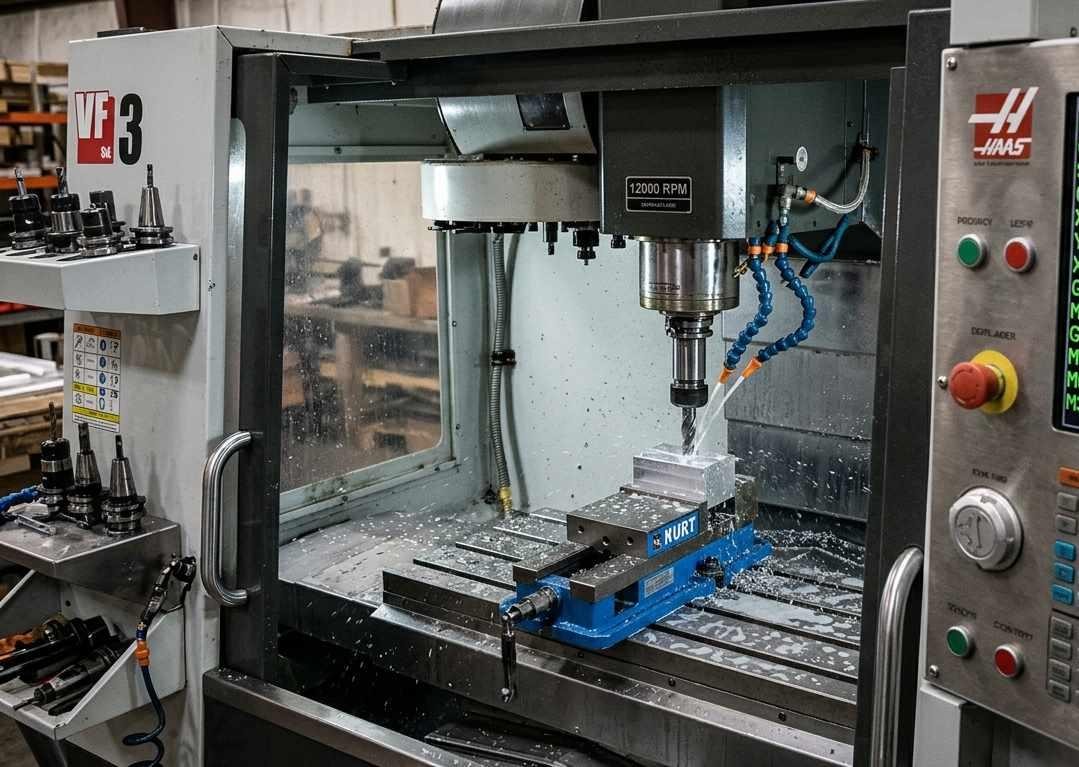
CNC milling machine cutting an aluminum workpiece
Basic G code and M code are widely used in CNC part programs. ISO 6983-1:2009 defines a program data format and address-word framework for certain numerically controlled machines. It does not make every G or M code number, modal group, or machine function universal. The meaning and availability of individual codes can vary by controller, machine type, enabled options, and machine-builder configuration. The letter identifies an address category, while the following number specifies a command within that controller's programming system. The letter prefix "G" and "M" tells you what kind of instruction it is. The number tells you which specific function within that category.
| Factor | G Code | M Code |
|---|---|---|
| Controls | Geometry and motion | Machine functions |
| Examples | G00 rapid, G01 feed, G02 arc | M03 spindle on, M08 coolant on |
| Type | Mostly modal | Mix of modal and non-modal |
| Affects | Tool path and cutting cycles | Spindle, coolant, program flow |
| Can appear together | Yes, in the same block | Yes, usually one M per block |
What G Codes Control
G codes define motion commands and many of the operating modes that determine how a CNC program is interpreted. Depending on the code and controller, they can select absolute or incremental positioning, set the interpolation plane, activate cutter compensation, or call a canned cycle. Motion commands such as G00, G01, G02, and G03 determine how the tool moves between programmed positions.
To understand how these commands relate to the cutter's actual route through the material, read our guide to CNC toolpaths.
Some of the motion types G codes define:
- G00 commands rapid positioning to a programmed location. It is commonly used to approach a cutting position or retract after machining, but it does not guarantee a collision-free path. The programmed move must account for the workpiece, fixtures, tool geometry, and machine-specific rapid-motion behavior.
- G01 tells the machine to move the tool in a straight line at a specified feed rate, while cutting. It's used when the tool needs to remove material along a straight path.
- G02 tells the machine to move in a circular arc clockwise.
- G03 tells the machine to move in a circular arc counterclockwise.
- G codes like G81 through G89 activate canned cycles. Canned cycles are pre-programmed sequences of movements that the machine performs using a single code. G81 is a basic drilling canned cycle on many milling controllers. A typical block specifies the hole coordinates, the R-plane position, the final Z depth, and the drilling feed rate. The controller handles the approach, feed, and retract motions according to its cycle definition and the active positioning modes. The programmer must verify the retract level and clearance above the workpiece before running the cycle.
For a more complete list of G codes, please check JLCCNC's G code list.
What M Codes Control
M codes generally control auxiliary machine functions rather than defining the tool's geometric path. Depending on the machine, they may start or stop the spindle, switch coolant, initiate a tool change, pause the program, or trigger machine-specific operations.
The spindle is controlled by M codes. M03 commands clockwise spindle rotation, M04 commands counterclockwise rotation, and M05 stops the spindle. Confirm the control's direction convention and the spindle setup before running the program. Coolant is controlled by M codes, M08 turns flood coolant on, M09 turns it off. M codes can initiate tool changes, pause or end a program, and control machine-specific auxiliary functions. On turning centers and machines with multiple spindles or turrets, additional M codes may select or synchronize machine units, depending on the machine-builder implementation.
For a more complete list of M codes, please check JLCCNC's M code list.

Precision CNC Machining Service
Upload your CAD files to get an instant CNC machining quote and DFM feedback from JLCCNC engineers.
How Do G Codes and M Codes Work Together in a CNC Program?
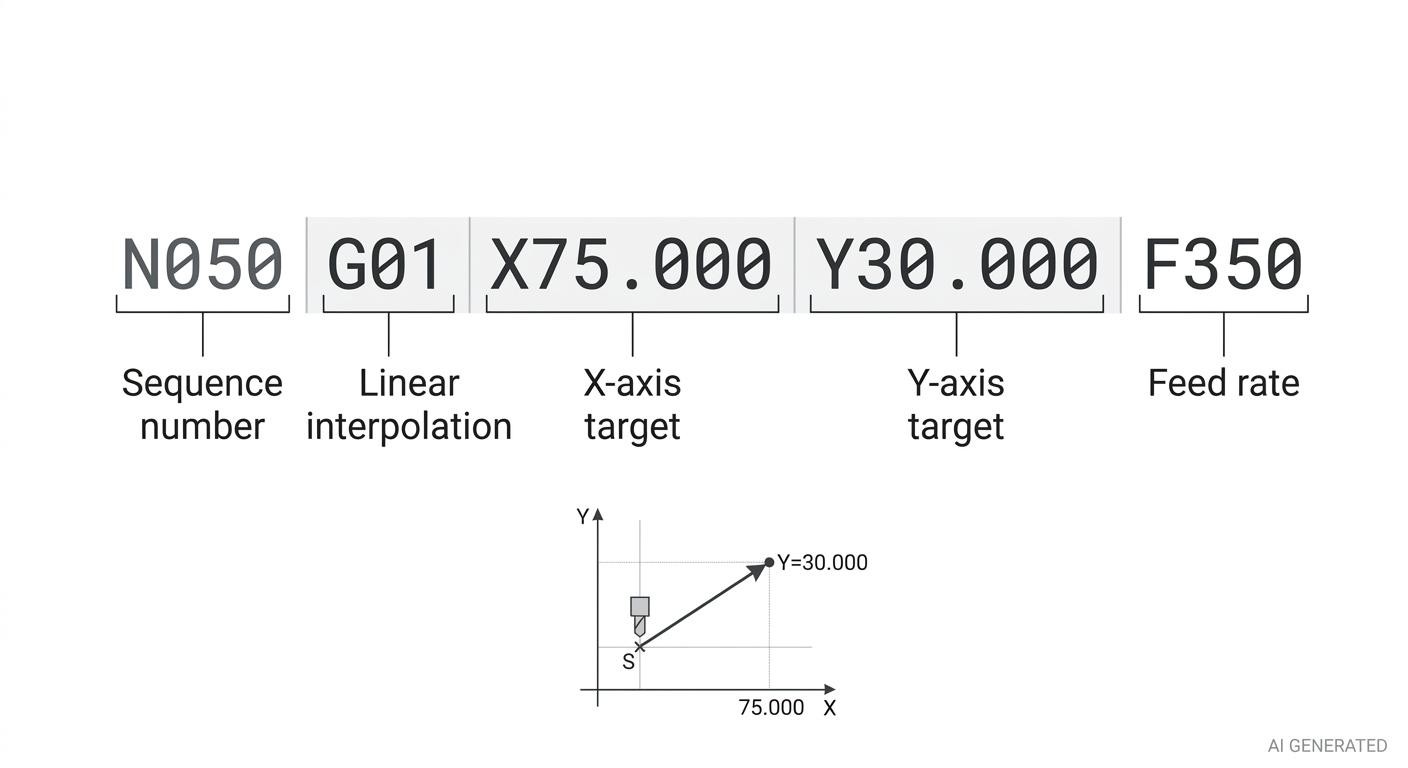
Annotated CNC program block showing the sequence number
A CNC program file has a sequence of lines of code. Each line can have G codes and M codes alongside others. The controller reads each line in sequence and executes the combined instructions.
How a CNC Program Block Is Structured
A CNC program block may contain a sequence number (N), one or more G codes, axis coordinates, a feed-rate word (F), a spindle-speed word (S), a tool number (T), and an M code. The required words depend on the operation and the controller. Many blocks contain only the addresses needed for that step, with modal settings carried forward from earlier blocks.
A typical block might look like this
N050 G01 X75.000 Y30.000 F350This block commands a linear move to X75.000, Y30.000 at a programmed feed rate of 350 in the currently active feed mode. The actual distance units and feed interpretation depend on the active modal settings, including the unit-selection and feed-mode commands established earlier in the program.
Multiple G codes can appear in one block when they belong to compatible modal groups. A modal group contains mutually exclusive G codes, so only one code from that group can be active at a time. G codes from the same group cannot both appear in the same block because they would conflict. One M code per block is the standard practice on most controllers, even where the syntax technically permits more.
Reading a CNC Milling Program Line by Line
The following example illustrates a basic three-axis milling sequence. It is intended to show how G codes and M codes work together in a program, not to serve as a production-ready program. Actual code behavior and safe motion depend on the CNC control and machine setup.
Several lines illustrate how a CNC program executes:
N010 G21 G17 G40 G49 G80— Initial mode setup. Selects metric units and the XY plane, then cancels cutter radius compensation, tool length compensation, and canned cycles. It does not reset every modal state.N020 G28 G91 Z0— Reference return. Uses a common G28 return pattern. The actual motion depends on the control and machine configuration, so the return path and clearance must be verified.N040 T01 M06andN050 G90 G54— Tool and work coordinate system selection. The program calls tool 1, commands a tool change, selects absolute positioning, and activates work coordinate system G54. A tool length offset must also be applied with the appropriate G43 H command before machining at a programmed Z position that depends on tool length.N060 S4500 M03— Spindle start. Commands 4,500 RPM and clockwise spindle rotation.N070toN090— Positioning and feed motion. The tool moves to the programmed XY position, moves to Z5.0, and then feeds to Z−8.0. The Z positions are relative to the active work coordinate system; confirm that the path clears the stock and fixtures.N100 X120.0 F350— Modal motion. G01 remains active from the previous block, so the tool continues with a linear feed move to X120.0. The feed values use the active feed mode; this example does not explicitly set G94.N110toN140— Retract and program end. The program commands a Z retract, stops the spindle, switches coolant off, and ends with M30. The retract height and end-of-program behavior must be checked against the machine setup and control.
Modal and Non-Modal Codes in Program Execution
Modal G-codes are settings that stay active until you change them.
For example, in CNC machining:
- G01 means the machine moves in a straight line at a controlled feed rate.
- Once you write G01, the machine keeps using that movement mode for the next moves, even if you don't write G01 again.
- G00 tells the machine to switch to rapid movement, so it moves quickly instead of following the G01 feed movement.
Example
G01 X10
X20
X30
G00 X50
Here's what happens:
| Code | What it means |
|---|---|
| G01 X10 | Move to X10 at the programmed feed rate. |
| X20 | Move to X20 using the same feed movement. |
| X30 | Move to X30 using the same feed movement. |
| G00 X50 | Now switch to rapid movement and move to X50. |
Because G01 is modal, it does not need to be repeated in every subsequent block while that motion mode remains active. This reduces repetition, but the programmer must still track which motion mode is in effect.
However, you must remember which mode is currently active. If you assume the machine is moving slowly with G01 when G00 is actually active, you could cause an error or even damage the tool or workpiece.
While, non-modal codes are active for a single block only.
Example
G04 (dwell, pause for a specified time)
It executes once in the block where it appears and has no effect on subsequent blocks.
Understanding modal behavior is essential for debugging CNC programs. A machining error that appears in the middle of a program often traces back to a modal state set several blocks earlier rather than to the block where the error manifested.
How Are G Codes and M Codes Generated and Verified?
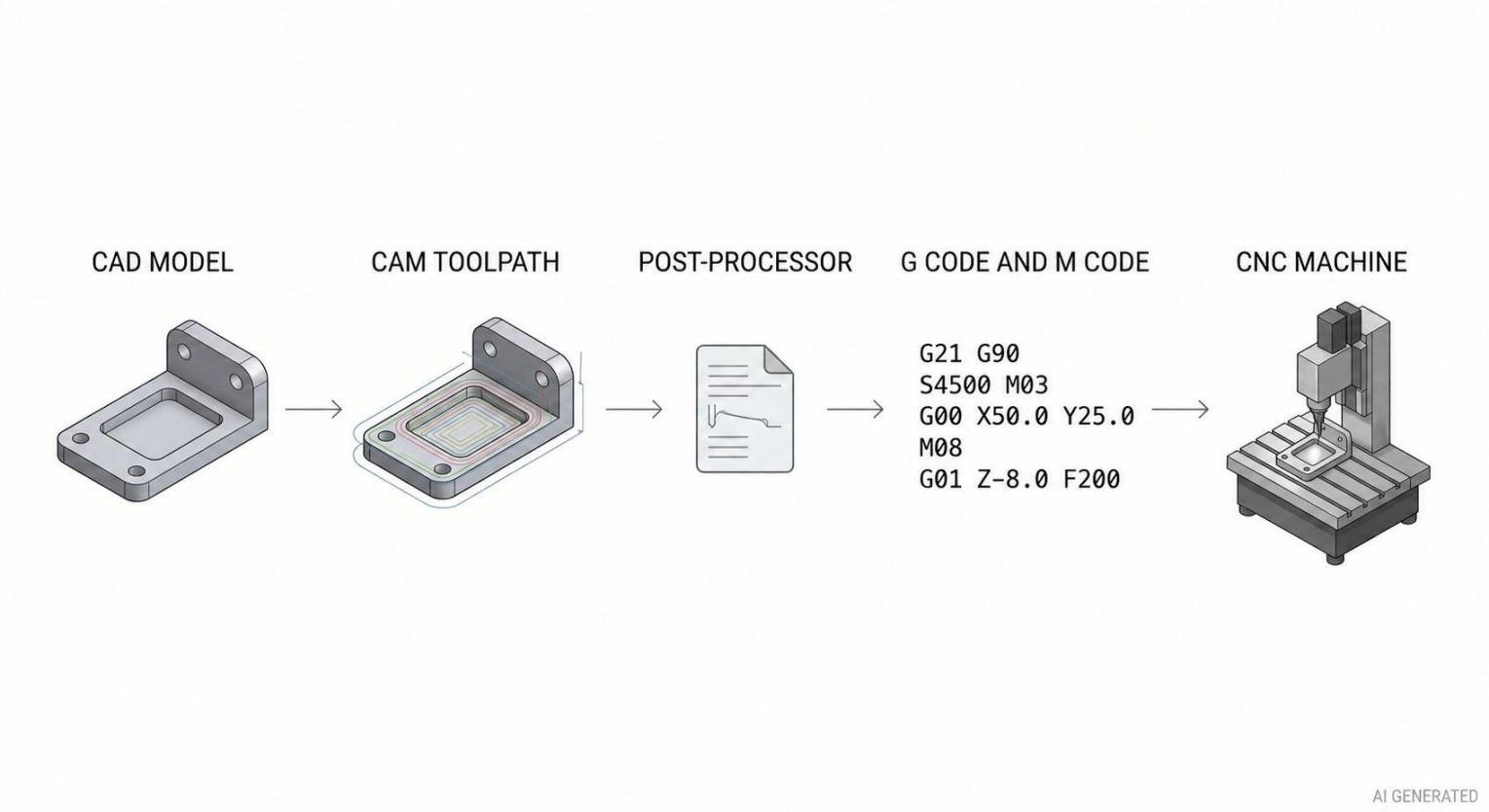
CNC programming workflow
Most production CNC programs are not written from scratch in G code. They're generated by CAM software from 3D geometry and then verified before running on the machine.
CAD/CAM and Post-Processor Workflow
In a typical CAD/CAM workflow, the programmer imports the part geometry, defines machining operations, and generates toolpaths using selected tools and cutting parameters. The post-processor then converts the CAM output into NC program syntax suited to the target machine and controller. A post-processor configured for one machine may not be suitable for another, even when both use the same controller family, because axis configuration, machine options, tool-change logic, and auxiliary M codes can differ.
The post-processor must match the target machine and controller. It determines how CAM operations are translated into controller-specific motion commands, cycles, and auxiliary functions. However, a valid post-processed program can still contain incorrect toolpaths, offsets, or machining parameters, so the output must be verified before production use.
Internal toolpath simulation and final NC program verification serve different purposes. Toolpath simulation checks the programmed cutting path generated in CAM, while NC program verification evaluates the post-processed code against a model of the target machine and its operating conditions. The reliability of either check depends on how accurately the simulation or verification setup represents the actual controller, machine configuration, tools, fixtures, and stock. A successful simulation does not by itself establish that the final NC program is safe to run on the machine.
See how a CNC post-processor converts CAM toolpaths into machine-ready G-code in detail.
Verifying and Proving Out Generated CNC Programs
CAM systems can simulate toolpaths generated within the CAM environment. This can reveal issues such as unintended cutting paths, incorrect tool selection, or rapid moves into the stock. However, CAM simulation does not necessarily reproduce how the target controller interprets the final post-processed NC program.
Dedicated NC verification software can analyze post-processed programs using supported controller models and machine configurations. Depending on the software and its configuration, verification may account for modal states, coordinate transformations, canned cycles, and machine motion. Its ability to detect post-processor errors depends on the functions supported and the accuracy of the controller model and machine setup.
Before running a new or modified program in production, follow the machine manufacturer's program proving and verification procedures. Where supported, use graphics or machine simulation first. Then perform a controlled dry run or other prescribed proving procedure, ensuring adequate clearance between the tool, workpiece, fixtures, and other machine components. Use single-block execution and appropriate feed and rapid overrides as required by the machine manual. Reduced override settings provide additional time to observe motion but do not eliminate collision risk.
Precision CNC Machining Service
Upload your CAD file to get a fast quote starting from $1, with lead times as short as 3 days.
Common G Codes and M Codes Used in CNC Machining
Common Milling G Codes — Typical Fanuc/Haas-Style Definitions
| G Code | Function | Modal? |
|---|---|---|
| G00 | Rapid traverse positioning | Modal |
| G01 | Linear interpolation (feed) | Modal |
| G02 | Circular interpolation CW | Modal |
| G03 | Circular interpolation CCW | Modal |
| G04 | Dwell (timed pause) | Non-modal |
| G17 | XY plane selection | Modal |
| G20 | Inch input | Modal |
| G21 | Metric input | Modal |
| G28 | Reference return via the control's G28 sequence | Non-modal |
| G40 | Cancel cutter radius compensation | Modal |
| G41 | Cutter radius comp left | Modal |
| G42 | Cutter radius comp right | Modal |
| G43 | Apply positive tool length compensation | Modal |
| G49 | Cancel tool length offset | Modal |
| G54–G59 | Work coordinate system selection | Modal |
| G80 | Cancel canned cycle | Modal |
| G81 | Drilling cycle | Modal |
| G83 | Peck drilling cycle | Modal |
| G84 | Tapping cycle | Modal |
| G90 | Absolute coordinate mode | Modal |
| G91 | Incremental coordinate mode | Modal |
| G94 | Feed per minute | Modal |
| G95 | Feed per revolution | Modal |
| G98 | Canned cycle return to initial Z | Modal |
| G99 | Canned cycle return to R plane | Modal |
Common M Codes for Spindle, Coolant, and Program Control
| M Code | Function | Notes |
|---|---|---|
| M00 | Program stop | Operator must restart |
| M01 | Optional stop | Active only if optional stop switch enabled |
| M02 | End of program | Varies by controller |
| M03 | Spindle start CW | Requires S word for speed |
| M04 | Spindle start CCW | Used in tapping on some controllers |
| M05 | Spindle stop | |
| M06 | Tool change | Requires T word for tool number |
| M08 | Flood coolant on | |
| M09 | Coolant off | Cancels all coolant |
| M19 | Spindle orient | For tool change position |
| M30 | Program end, commonly with a program reset or rewind function | Most common program end |
| M41/M42 | Gear-range selection on supported machines | Function and availability depend on the machine builder |
| M48 | Enable feed and/or spindle override functions on controls that support this convention | Confirm the control-specific behavior and settings |
| M49 | Disable feed and/or spindle override functions where supported; verify the control manual | Used in tapping cycles |
These represent the most widely implemented codes. Specific code numbers and their exact behavior depend on the controller. Verify against the machine's programming manual.
Do G Codes and M Codes Work the Same on Every CNC Machine?
The short answer is no, and this is one of the most consistent sources of confusion for programmers moving between machines.
Differences Between CNC Milling and Turning
Milling and turning programs use largely the same G code structure for motion but differ significantly in axis naming, coordinate systems, and some cycle behaviors. On a turning center, the X axis controls the diameter dimension (often specified as diameter value, not radius), and Z controls length along the spindle axis. A G01 move to X50.0 on a lathe means moving to a diameter of 50mm, very different from the same code on a mill where X50.0 is a linear position.
Threading on a turning center uses G32 (single-pass thread cutting) or G76 (multi-pass thread cycle), codes that have no equivalent in milling. Facing and turning cycles specific to lathes (G70, G71, G72 on Fanuc) don't exist in milling contexts. Live tooling on turning centers introduces milling-type motion codes (G12.1 polar coordinate interpolation, for example) alongside turning codes, making turning center programming its own dialect.
Controller and Machine-Builder Variations
The ISO 6983 standard defines the framework but leaves significant room for manufacturer implementation. Fanuc controls dominate production CNC globally, and Fanuc syntax has become something of a de facto standard, but Fanuc 0i, 10/11, 16/18, 30/31/32 series all have syntax differences between them. Haas controls are Fanuc-compatible for most basic codes but use different M codes for machine-specific functions. Siemens 840D uses its own syntax for cycles and some G codes. Mitsubishi, Mazak MAZATROL, and Okuma OSP each have their own implementation.
M codes especially are machine-specific. M08 for flood coolant is common but not universal. The M code for through-spindle coolant, high-pressure coolant, air blast, or chip conveyor varies between machine builders and sometimes between models from the same builder. Never assume an M code from one machine works on another without verifying against the specific machine's documentation.
Basic G Code and M Code Mistakes That Affect Machining
| Common mistake | What goes wrong |
|---|---|
| Using G91 instead of G90 | G91 interprets axis values as incremental distances from the current position, whereas G90 uses absolute positions in the active coordinate system. If a program expects G90 but G91 remains active, subsequent moves may accumulate from the wrong starting positions and cause unintended tool motion. |
| Forgetting G80 | A drilling or tapping cycle stays active and may repeat at positions where it wasn't intended. |
| Setting spindle speed without M03 or M04 | The S command sets the spindle speed, but doesn't start it. The tool may cut while the spindle is stopped. |
| Using the wrong post-processor | The program may output incorrect or incompatible commands for the machine, causing functions to behave incorrectly. |
| Selecting the wrong work coordinate system | Using the wrong offset, such as G55 instead of G54, shifts the tool away from the intended machining position. |
| Mixing inch and metric units | Using G20 and G21 incorrectly can make the machine interpret distances at the wrong scale, causing major positioning errors. |
FAQs About G Codes and M Codes
Can G Codes and M Codes Appear in the Same Program Block?
Yes. A CNC program block can contain a G code and an M code alongside axis coordinates or other address words when the controller permits that combination. For example, G00 X50.0 Y25.0 M08 combines rapid positioning with a coolant command on controls that support this block format. The exact execution order and permitted combinations depend on the controller and machine configuration.
What Does Modal G Code Mean?
A modal G code stays active until another code in the same group replaces it. For example, G01 keeps the machine moving in straight lines at the programmed feed rate until another motion code changes the mode.
Do All CNC Machines Use the Same G Codes and M Codes?
No. Common codes like G00, G01, and M03 work on many CNC machines, but others vary by controller and machine type. Always check the machine's programming manual.
Do CNC Machinists Still Write G Code Manually?
Yes. CAM software generates most production programs, but machinists still write and edit G code for simple operations, troubleshooting, and program adjustments. Knowing how to read G code also helps them spot errors in CAM output.
Popular Articles
• What is G Code and M Code: Differences, Uses & Examples
• Are There Any Design Limitations or Restrictions for CNC Machining
• From CAD to CNC The Importance of Accurate 3D Modeling in Manufacturing
• Understanding CNC Machine Tolerances and Their Impact on Part Accuracy
• How to Learn CNC Programming: A Step-by-Step Guide for Beginners
Keep Learning
What is G Code and M Code: Differences, Uses & Examples
Key Takeaways G codes define tool motion and machining modes, while M codes control auxiliary functions such as spindle operation, coolant, and program stops. G codes are mostly modal (they stay active until changed), whereas M codes are a mix of modal and non-modal commands. The exact meaning of a code varies by controller and machine type, so you must verify against the machine's programming manual. Most production programs are generated by CAM software and then verified against the specific machine......
CNC G Code List: Functions and Common Uses
Key Takeaways G codes control CNC motion modes and machining functions, including rapid positioning, linear and circular interpolation, canned cycles, coordinate selection, and tool compensation. Feed rate values are typically specified with the F address, while G codes such as G94 and G95 select how the feed rate is interpreted. Modal G codes stay active once programmed until cancelled by another code in the same group. Non-modal G codes apply only to the block where they appear. Codes such as G00, G......
CNC M Code List: Functions and Common Uses
Key Takeaways G codes define motion and machining modes, while M codes trigger auxiliary machine functions. Common M codes include M00/M01 for program stops, M03/M04/M05 for spindle control, and M08/M09 for coolant control. M-code assignments for functions such as chuck control, pallet changes, and live tooling vary by machine builder and model. Always verify machine-specific M codes against the target machine's programming manual before running a CNC program. An M code (miscellaneous code) is a CNC p......
Are There Any Design Limitations or Restrictions for CNC Machining
Quick Answer: CNC design is limited mainly by tool access, cutter radius, part rigidity, workholding, machine travel, material behavior, and tolerance requirements. Review those constraints before finalizing CAD, especially for deep pockets, thin walls, internal corners, undercuts, small threads, and critical fits. A design that looks completely reasonable in CAD can turn out to be genuinely difficult — or impossible — to machine as drawn. Not because the geometry is wrong in any absolute sense, but b......
GD&T in CNC Machining: Everything You Need to Know.
Why Does GD&T Matter in CNC Manufacturing? (autodesk) What is GD and T? Ask five machinists to interpret a drawing without it and you might end up with five completely different parts. That's because traditional linear dimensions and notes can only go so far, leaving plenty of room for misinterpretation. This is where GD&T (Geometric Dimensioning and Tolerancing), the universal language of engineers, is used to define how a part should truly function and fit. At its core, GD&T is a symbolic system tha......
What Is CNC Programming? A Complete Guide
What Is CNC Programming? A Complete Guide A finished CAD model doesn't cut anything by itself. Between a 3D design sitting on a screen and an actual part coming off a machine, there's a translation step that turns geometry into motion — where the tool goes, how fast it moves, when it changes, when coolant kicks on. That translation is CNC programming, and it's easy to take for granted until something in it goes wrong: a program that runs a toolpath through a clamp, a feed rate that's fine on paper but......