How to Design for UV Printing and Laser Marking
Last updated on Aug 29, 2026
Introduction
UV printing and laser marking are both essential processes in product manufacturing, used to print labels, patterns, or text on product surfaces. While these two techniques share similarities, there are significant differences between them.
UV printing is a digital printing technology that uses ultraviolet (UV) light to instantly cure special ink containing photosensitizers so that they adhere to the substrate. The typical thickness range of UV printing ink layer is 0.008-0.025 (mm) protruding from the surface. The UV printing process is "instantly printed and dry", and the production efficiency is very high. It is suitable for processing almost all kinds of material surfaces. UV printing can easily achieve high-resolution printing (1440dpi) and supports color printing.
Laser marking involves using focused laser engraving technology to etch the desired characters and patterns onto the surface of an object. The marked area created by laser marking will have a recessed depth of 0.03-0.1 mm. Compared to traditional printing methods, laser marking offers advantages such as high quality, excellent consistency, strong wear resistance, high efficiency, cost savings, and safety and reliability. Laser markings are permanent and provide a strong anti-counterfeiting protection.
Both marking methods can leave a certain depth on the product surface. The biggest difference between screen printing and laser marking is that laser marking uses a laser beam to directly mark the product surface, with the laser energy causing material vaporization or color changes to form the mark. Laser markings produced are usually very precise, allowing for highly detailed patterns and text. However, the color is limited to a single tone, which is determined by the material and surface treatment properties.
Technical Requirements
| UV printing | Laser marking | |
|---|---|---|
| File Format1 | dwg./dxf. | dwg./dxf. |
| Color Settings | Requiring Specification | No Specification Needed (Anodized Colors) |
| Dimensional Requirements |
|
Note:
1. File Format: Preferably use CAD-exported file formats. Otherwise, machining precision cannot be guaranteed.
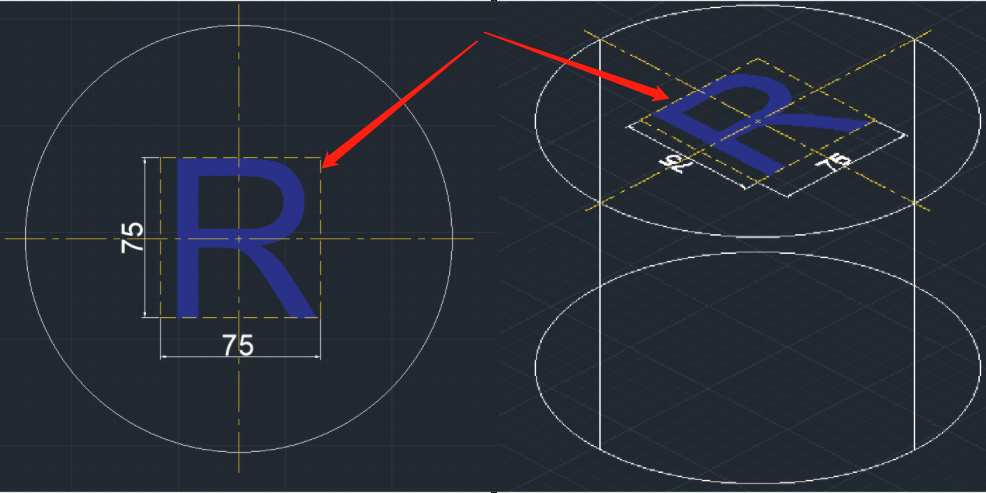
2. Special Settings: As shown in the diagram below, it is essential to specify the marking location and dimension frame.
Considerations in the Design Process
To achieve the desired UV printing and laser marking patterns on the workpiece surface, the following considerations should be noted during the design process.
Screen Printing Design Considerations:
- Image resolution: The image (bitmap) resolution used in design is recommended to be between 300-720 DPI. Although the printer may only support up to 1440 dpi, high-resolution source files ensure that they remain sharp after scaling and editing.
- Material selection: Since UV printing inevitably needs to use UV light to solidify the ink during the working process, the material of the printed object needs to be confirmed before printing to ensure that the material will not be affected by UV light. Especially for cases where large-scale patterns require multiple PASS printing.
Material examples reference:
- Some cheap white PVC boards and PVC soft films. After being irradiated by the UV lamp, the white color will obviously turn yellow, especially when printing multiple times or the curing power is too high.
- Acrylic made from recycled materials or some non-UV stable acrylic. High-quality extruded boards and cast boards have strong UV resistance, but low-quality boards are prone to yellowing.
- Many 3D printing uses ABS materials, some toys, and electronic casings. ABS will not only turn yellow under UV irradiation, but also accelerate embrittlement.
- Some materials containing unsaturated resin.
Minimum line width/font size: Too thin lines (such as less than 0.5pt=0.176mm) may cause incomplete printing or broken lines, especially white ink. Also avoid using too small font sizes for text (such as less than 6pt=2.117mm). 1pt≈0.35mm
Laser Marking Design Considerations:
- Details: Laser marking can handle very fine patterns and text, but ensure lines are clear and of sufficient thickness to avoid detail loss during marking.
- Material Considerations: Different materials produce different results with laser marking. Consider the material's reflectivity and surface characteristics in your design.
- Color Handling: Laser marking oxidizes the surface material directly. Therefore, the printing effect will vary with different materials and surface roughness.
- Resolution: Ensure the design file's resolution is high enough (usually at least 300dpi) to guarantee clear and sharp images, especially for complex patterns. Thus, ensure the file format meets the requirements.
- Margins: Account for the printing margin (usually 3mm) in your design to avoid incomplete patterns during printing.

Precision CNC Machining Service
Professional manufacturing, fast turnaround, and quality assurance.