4-Axis CNC Machining: How It Works, Benefits, and Applications
18 min
- What Is 4-Axis CNC Machining?
- How Does 4-Axis CNC Machining Work?
- 3-Axis vs 4-Axis vs 5-Axis CNC Machining
- Choosing the Right Number of Axes
- When Should You Choose 4-Axis CNC Machining?
- Advantages and Limitations of 4-Axis CNC Machining
- Common Limitations of 4-Axis Machining
- Design Considerations for 4-Axis CNC Machining
- Cost Considerations for 4-Axis CNC Machining
- Common Applications of 4-Axis CNC Machining
- FAQ about 4-Axis CNC Machining
- Conclusion About 4-Axis CNC Machining
Key Takeaways
Fourth axis adds rotation: 4-axis CNC machining adds a rotary A-axis to standard 3-axis X, Y, Z motion, allowing the workpiece to rotate and exposing multiple faces or cylindrical surfaces without manual repositioning.
Two operating modes: Indexed (3+1) machining rotates the part to a fixed position and then mills in 3-axis, while continuous 4-axis machining runs rotation and linear motion simultaneously for helical and cam-profile work.
Fewer setups, better accuracy: 4-axis CNC machining reduces the number of setups for multi-sided parts, improves positional accuracy between features on different faces, and enables helical machining that 3-axis cannot do efficiently.
Practical middle ground: The cost sits above 3-axis machining but below full 5-axis, making it the right choice for cylindrical parts, multi-face components, and medium-complexity geometry.
Design matters: Design for 4-axis machining requires considering rotary axis accessibility, workholding, and which features can be reached from the rotational centerline.
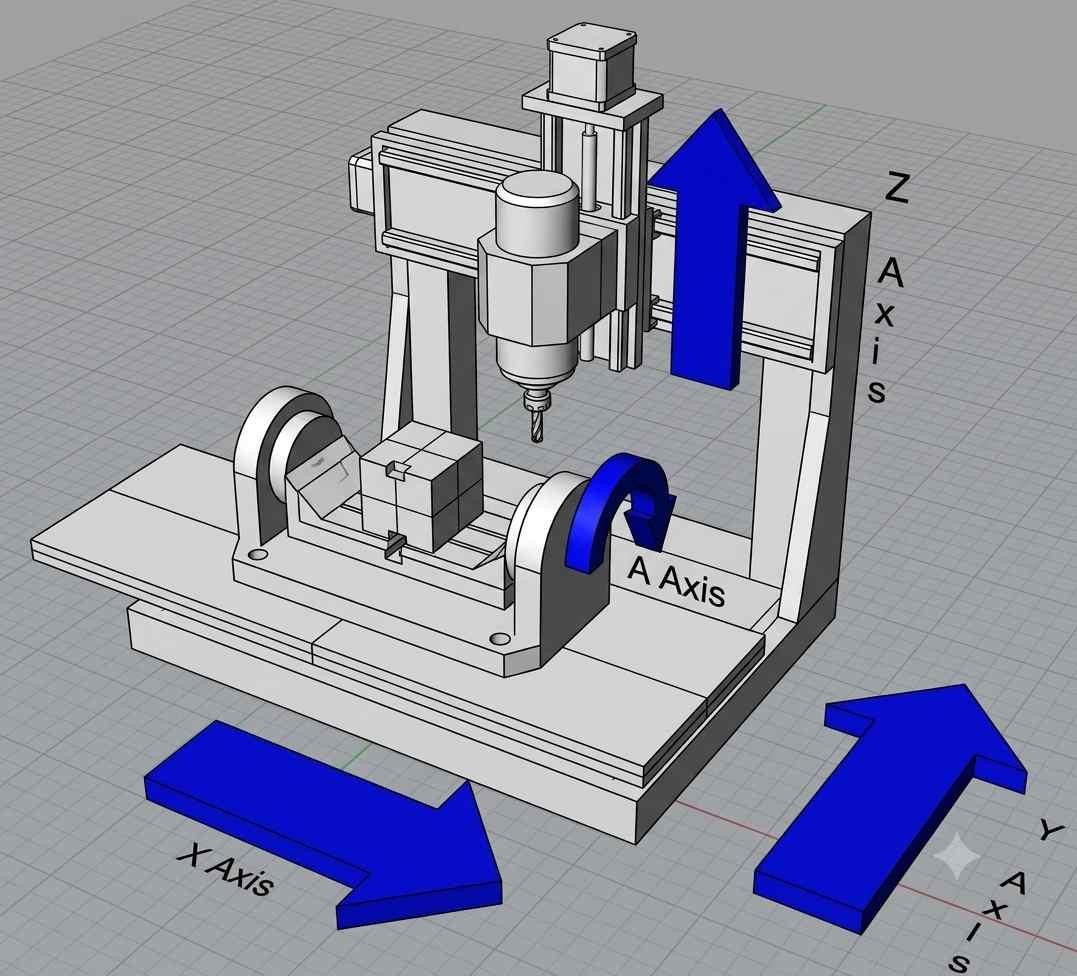
(AI generated) 3D rendered explanation of 4-axis CNC machining
Three axes get a lot of parts made. But there's a whole category of geometry where three axes mean four or five separate setups, repositioning the part, re-indicating datums, re-clamping, and hoping the accumulated positioning error across all those setups stays within tolerance. A fourth rotary axis solves this. Not by making the machine smarter, but by making the workpiece rotate while the cutting happens, so faces that would have needed their own setup become accessible in one continuous operation.
4-axis CNC machining sits between 3-axis and 5-axis in capability and cost, and for the right part geometry it hits a sweet spot that neither extreme does as efficiently.
What Is 4-Axis CNC Machining?
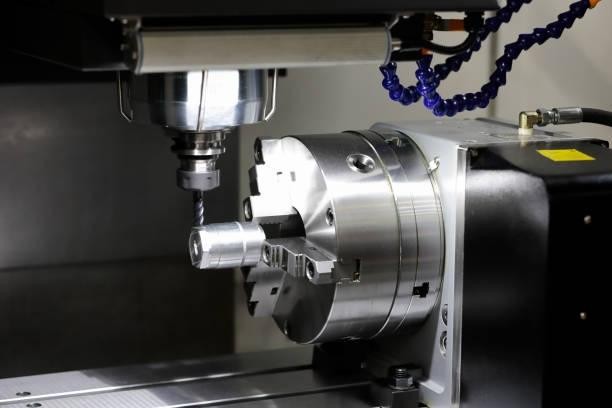
(Istock) 4-axis CNC machining
4-axis CNC machining is a CNC milling process that adds a fourth rotary axis, typically the A-axis rotating around the X-axis, to the standard X, Y, and Z axes. This allows the workpiece to rotate during or between cutting operations so multiple faces and cylindrical features can be machined in a single setup.
How a Fourth Axis Expands CNC Milling
Standard 3-axis machining moves the cutting tool in X, Y, and Z. The workpiece stays fixed. To machine a second face, you remove the part from the fixture, reposition it, re-clamp, re-indicate, and run the program again. Each repositioning introduces potential positioning error and takes setup time that adds cost, particularly on low-to-medium volume runs.
The fourth axis, a rotary table or trunnion that rotates the workpiece around one of the linear axes, changes this. Faces that would have required individual setups become accessible by rotating the part to the correct angle and cutting from there, all within one fixture and one reference datum. The tool still moves in X, Y, and Z. What changes is that the workpiece can present different faces to the tool without being removed from the machine.
Why Manufacturers Use 4-Axis CNC Machining
4-axis CNC machining is generally selected to reduce repeated setups on multi-face and cylindrical parts. By rotating the workpiece within the same fixture, the machine maintains a common datum while exposing additional machining surfaces. The way this rotary motion is used depends on whether the operation is indexed or continuous.
How Does 4-Axis CNC Machining Work?
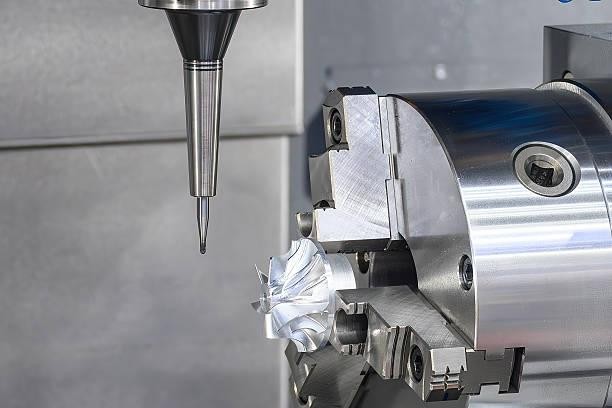
(Istock) 4-axis CNC machine
Indexed (3+1) Machining
In indexed 4-axis CNC machining, the rotary axis positions the workpiece at a specific angle, locks, and then the machine runs in conventional 3-axis mode, X, Y, Z motion only, with the A-axis stationary. The part rotates to the next required angle, locks again, and the next operation runs.
This is the most common 4-axis mode in general production machining because it's simpler to program, works on a broader range of machine types, and handles the majority of multi-sided parts efficiently. The rotary axis essentially acts as an automated repositioning device, more accurate and faster than manual repositioning, without requiring simultaneous multi-axis interpolation.
For a part needing features on four faces at 90-degree increments: the machine cuts face one, the A-axis rotates 90 degrees and locks, cuts face two, rotates again, cuts face three, and so on. All four operations share the same datum reference, keeping the positional accuracy between features tighter than any manual repositioning approach would produce.
Continuous 4-Axis Machining
Continuous 4-axis CNC milling interpolates the A-axis simultaneously with the linear axes, the workpiece rotates and the tool moves in X, Y, Z at the same time, with all four axes coordinated by the controller. This is what makes true helical milling, spiral groove cutting, and cam profile machining possible.
A helical groove cut around a cylindrical shaft requires the part to rotate continuously while the tool advances along its length. Indexed machining can only approximate this geometry through a series of indexed cuts.
Rotary Motion and Tool Coordination
The controller coordinates all four axes using the same CNC program, datum reference, and coordinate system. When the A-axis rotates the workpiece, the controller automatically updates the effective X, Y, Z coordinates to maintain the relationship between tool position and workpiece geometry. From the programmer's perspective in continuous mode, the toolpath is described in terms of the final part geometry, the controller handles the axis interpolation required to produce it.
3-Axis vs 4-Axis vs 5-Axis CNC Machining
| Factor | 3-Axis | 4-Axis | 5-Axis |
|---|---|---|---|
| Motion axes | X, Y, Z | X, Y, Z + A (rotary) | X, Y, Z + A + B or C |
| Simultaneous axis motion | 3 axes | 3 linear + 1 rotary | Up to 5 simultaneous |
| Multi-face machining | Multiple setups required | Single setup via rotation | Single setup, full access |
| Undercuts and compound angles | Not possible | Limited, one rotary plane | Full compound angle access |
| Helical and cam machining | Not possible | Yes, continuous mode | Yes |
| Programming complexity | Standard | Moderate | High |
| Machine cost | Lowest | Moderate | Highest |
| Part cost (typical) | Lowest for simple parts | Lower than 5-axis for cylindrical and 4-sided parts | Justified for complex 3D geometry |
| Best for | Prismatic parts, simple geometry | Cylindrical parts, multi-face components | Complex 3D surfaces, compound angles |
Learn more about the differences between 3-, 4-, and 5-axis CNC machining.
Choosing the Right Number of Axes
- If every feature can be reached from a single direction, a 3-axis machine is usually sufficient.
- When features wrap around a cylindrical surface or appear on multiple faces, adding a rotary axis often improves efficiency.
- Parts with compound angles or true undercuts generally require 5-axis machining.
When Should You Choose 4-Axis CNC Machining?
Reducing Multiple Setups
If a part needs machining on four sides and you're running it on a 3-axis machine, that's four setups. Each setup takes time, introduces potential datum shift, and requires re-verification before cutting starts. At low volumes, four setups per part is manageable but slow. At medium volumes, it becomes a throughput bottleneck. At any volume, the accumulated positioning error across four separate setups affects how precisely features on different faces relate to each other.
4-axis machining collapses those four setups into one. The time savings per part and the accuracy improvement in inter-feature relationships are both real and significant on parts with this geometry.
Machining Around a Rotary Axis
Parts with cylindrical geometry, shafts with keyways at multiple angular positions, rollers with helical grooves, and cylindrical housings with port features at specific rotational positions are natural 4-axis applications. Indexing or rotating the part to each angular position and cutting from a fixed tool direction handles these features efficiently, often in the same setup that machines the cylindrical turning features or other primary geometry.
Balancing Capability and Cost
5-axis machining handles everything 4-axis does, plus compound angles and full undercut access. But 5-axis machines cost more per hour to run, and the programming is more complex. For parts that don't need compound angle access, which is most cylindrical and four-sided prismatic parts, 4-axis milling delivers the same multi-setup reduction at lower machine cost. It's the economically correct choice for the broad category of parts that need rotational capability without true simultaneous 5-axis motion.
Not sure whether your part needs 4-axis CNC milling or a different approach? Upload your files to JLCCNC and get engineering feedback on the most efficient machining strategy before production starts.

Precision CNC Machining Service
Professional manufacturing, fast turnaround, and quality assurance.
Advantages and Limitations of 4-Axis CNC Machining
Higher Productivity With Fewer Setups
Every setup eliminated from a production process saves setup time, reduces the opportunity for positioning error, and keeps the part in a known datum reference for all subsequent operations. On parts with four or more faces to machine, 4-axis can reduce setup count from four or five individual operations to one, with corresponding reductions in non-cutting time per part.
Improved Accuracy for Multi-Sided Parts
When all features on all faces are machined from the same datum reference without removing the part from the fixture, the positional accuracy between features on different faces is governed by machine accuracy rather than fixturing accuracy. Machine-controlled indexing generally provides more consistent positioning than manual re-clamping.
Reduced Fixturing Time
Fixturing a part four times for four separate setups takes four times the fixturing labor of a single 4-axis setup. The fixture design is also simpler, rather than four setups each requiring their own workholding configuration, one 4-axis setup requires one fixture that holds the part through all operations.
Common Limitations of 4-Axis Machining
The rotary axis provides access to features around one rotational plane. Features that require access from compound angles, not just around a single rotation axis but tilted in two directions simultaneously, are beyond what 4-axis can reach without repositioning. That's the limit where 5-axis becomes necessary.
Programming continuous 4-axis toolpaths is more complex than 3-axis programming, particularly for helical and cam-profile geometry. Not all CAM software handles continuous 4-axis motion well, and not all programmers have experience with rotary axis interpolation.
| Factor | Advantage | Limitation |
|---|---|---|
| Setup count | Reduces multi-sided setups to one | One-time rotary setup is more complex than 3-axis setup |
| Feature access | All faces around one rotational axis | Cannot reach compound-angle features needing 5-axis |
| Inter-feature accuracy | All features share one datum | Overall tolerance is still limited by machine capability and the machining process |
| Programming | Standard CAM with rotary module | Continuous mode requires more sophisticated programming |
| Machine cost | Lower than 5-axis | Higher than 3-axis |
| Applications | Cylindrical, multi-sided, helical | Complex 3D surfaces, undercuts from multiple directions |
Design Considerations for 4-Axis CNC Machining
Rotary Axis Accessibility
Every feature machined in 4-axis mode needs to be accessible from the tool direction when the part is at the appropriate rotational angle. Features that face inward, are blocked by adjacent geometry at every rotational position, or require the tool to reach around a corner aren't 4-axis accessible, they need either a separate setup or a design modification that opens tool access.
Design review for 4-axis machining should specifically check each feature: at what rotational angle is this feature accessible, and is the tool path to it clear at that angle?
Workholding and Fixturing
4-axis workholding needs to hold the part securely through all rotational positions while leaving the features to be machined accessible. A cylindrical shaft held between centers is the classic 4-axis workholding approach, repeatable angular positioning, clean access to the full cylindrical surface, and simple datum reference. For prismatic parts, chuck or collet fixturing with a flat face for angular datum reference is common.
The fixture design needs to be checked at every rotational position for collision with the tool, tool holder, and spindle, interference that doesn't exist at 0 degrees may appear at 90 or 180 degrees when different parts of the fixture rotate into the working space.
Feature Orientation
Features that need to be precisely angularly related to each other, keyways, bolt hole patterns at specific angular positions, ports at defined rotational angles, need their angular relationships explicitly defined on the drawing. The 4-axis setup establishes these angular relationships from the fixture datum, so how the part is clocked into the fixture determines how all angular features relate.
Tolerance and Surface Finish Requirements
4-axis CNC milling achieves dimensional tolerances comparable to 3-axis on individual features. Inter-feature tolerances between faces, the positional accuracy of a feature on face 2 relative to a feature on face 1, are typically better than repositioned 3-axis setups because the datum reference doesn't change between faces.
Manufacturing Review Before Production
For complex 4-axis parts, a DFM review before programming confirms that all features are rotationally accessible, the workholding concept is viable for all operations, and the tolerance requirements are achievable with the planned approach. Catching a feature that requires 5-axis at the review stage is far less expensive than discovering it after fixturing is built and programming is underway.
Cost Considerations for 4-Axis CNC Machining
Factors That Affect Machining Cost
Machine hourly rate for 4-axis equipment runs higher than 3-axis due to the rotary axis hardware and the more sophisticated controller required. Programming time is higher for continuous 4-axis operations than for equivalent 3-axis work. Fixturing design may be more complex for 4-axis setups than for simple 3-axis operations.
Setup time per batch also changes character, a 4-axis setup is more involved than a simple 3-axis vise setup, but it replaces multiple individual setups rather than one, so the total setup time for a multi-sided part typically decreases.
When 4-Axis Reduces Overall Manufacturing Cost
The crossover point where 4-axis machining costs less than equivalent 3-axis work depends on how many setups the 4-axis approach eliminates. For a part requiring two setups on 3-axis, 4-axis may break even or be slightly more expensive. For a part requiring four or five 3-axis setups, 4-axis machining is almost always cheaper overall when setup time, fixturing labor, and re-indication time are properly accounted for.
At volume, the per-part setup cost reduction from 4-axis machining compounds significantly. At low-volume CNC machining, the more complex initial 4-axis setup may not pay off in small batches.
Common Applications of 4-Axis CNC Machining
Rotary Machining Operations
Keyways at multiple angular positions on a shaft, cross-holes through cylindrical components, flats at defined angles, helical thread milling on complex profiles, these are the operations where 4-axis's rotational capability directly enables what 3-axis can't do without multiple manual setups or dedicated fixtures. Learn more about angle milling and how it differs from rotary machining.
Multi-Face Precision Parts
Housings, manifolds, actuated valve bodies, and instrument enclosures with ports, bosses, and machined faces on multiple sides are produced more accurately and more efficiently on 4-axis equipment than through sequential 3-axis setups. The accuracy improvement on inter-face feature relationships is consistent and meaningful on precision parts.
Aerospace, Medical, and Industrial Applications
Aerospace structural components with features on multiple faces, medical implants requiring precise multi-surface geometry, industrial equipment parts with cylindrical features and multi-sided machined interfaces, these industries use 4-axis machining regularly because the combination of accuracy and setup efficiency it provides suits the part complexity and tolerance requirements these applications carry.
| Application | Part Type | Why 4-Axis | Industry |
|---|---|---|---|
| Helical groove cutting | Worms, spiral cams | Requires simultaneous A and Z motion | Gearboxes, automation |
| Multi-face prismatic parts | Housings, valve bodies | Access to 4+ faces in one setup | Industrial, aerospace |
| Rotary indexing operations | Flanges, hubs with bolt patterns | Angular feature location from one datum | General machining |
| Cam profile machining | Engine cams, eccentric profiles | Continuous A-axis contour following | Automotive, machinery |
| Cylindrical engraving | Rollers, cylinders with surface features | Wraps features around cylindrical surface | Consumer, industrial |
| Medical implant profiles | Bone screws, implant components | Multi-surface in one setup, accuracy critical | Medical devices |
| Aerospace structural parts | Brackets with features on multiple faces | Reduces setups, maintains datum reference | Aerospace |
| Impeller roughing | Blisk roughing before 5-axis finish | 4-axis accessible roughing cuts | Aerospace, energy |
FAQ about 4-Axis CNC Machining
Q: What is 4-axis CNC machining?
4-axis CNC machining is a milling process that adds a rotary A-axis to the standard three linear axes (X, Y, Z), allowing the workpiece to rotate either between operations or during cutting. This enables machining on multiple faces and cylindrical surfaces in a single setup without manual repositioning.
Q: What is the difference between 3-axis and 4-axis CNC machining?
3-axis machining moves the tool in X, Y, and Z only, the workpiece stays fixed. Machining multiple faces requires multiple separate setups. 4-axis machining adds a rotary axis that rotates the workpiece, allowing multiple faces and cylindrical features to be machined from one fixture and one datum reference, improving both efficiency and inter-feature accuracy.
Q: What is continuous 4-axis machining?
Continuous 4-axis machining interpolates the rotary axis simultaneously with the linear axes, the workpiece rotates while the tool moves in X, Y, Z, all coordinated by the controller. This enables helical groove cutting, cam profile machining, and spiral features that require simultaneous rotary and linear motion to produce correct geometry.
Q: What parts are best suited for 4-axis machining?
Cylindrical parts with features at multiple angular positions (keyways, cross-holes, flats), multi-sided prismatic parts needing machining on four or more faces, parts with helical or cam-profile geometry, and any part where 3-axis machining would require three or more separate setups to complete.
Q: Is 4-axis CNC better than 5-axis CNC?
Neither is universally better, they suit different geometry. 4-axis handles cylindrical and multi-sided parts efficiently at lower machine cost than 5-axis. 5-axis is necessary for compound-angle features, undercuts from multiple directions, and complex 3D surface geometry that 4-axis can't reach. For parts that fall within 4-axis capability, choosing 4-axis over 5-axis reduces cost without sacrificing the capability the part actually needs.
Q: Can a 4-axis CNC machine curved surfaces?
Yes, in continuous mode. Curved surfaces that spiral around a cylindrical axis, cam profiles, helical grooves, cylindrical contours, are machined by simultaneously interpolating the rotary axis with the linear axes. Compound curved surfaces requiring tilt in two directions simultaneously need 5-axis.
Q: What industries use 4-axis CNC machining?
Aerospace (structural brackets, multi-face components), medical devices (implant profiles, surgical instrument components), automotive (cam shafts, engine components), industrial equipment (valve bodies, manifolds, gearbox components), and general precision machining wherever multi-sided or cylindrical parts need accurate inter-feature relationships across multiple faces.
Q: How much does 4-axis CNC machining cost?
4-axis machine rates are generally higher than comparable 3-axis machining rates. For parts requiring multiple 3-axis setups, however, 4-axis total part cost is often lower because setup time reduction outweighs the higher machine rate. The cost comparison depends on part geometry, setup count comparison, and production volume. Parts with two or fewer equivalent 3-axis setups may be cheaper on 3-axis; parts requiring four or more setups are often more economical on 4-axis.
Precision CNC Machining Service
Professional manufacturing, fast turnaround, and quality assurance.
Conclusion About 4-Axis CNC Machining
4-axis CNC machining isn't a universal upgrade over 3-axis, nor is it simply the next step before 5-axis. Whether it makes sense depends on the part. Components with multiple machined faces or cylindrical features often benefit from a rotary axis, while other designs may be produced more efficiently using a different machining approach.
Choosing the machining strategy early can avoid unnecessary setups and reduce process changes later in production. The decision is usually driven by the part geometry first, then verified against tolerance requirements, machining accessibility, and the expected production volume.
JLCCNC provides 3-axis, 4-axis, and 5-axis CNC machining. Before production, our engineers review each design to determine which process best matches the part, rather than selecting a machining method by default. If you're evaluating a new design, upload your CAD file for a manufacturability review and machining recommendations.
Popular Articles
• What is Swiss Machining: Swiss CNC Machines and Their Precision
• Desktop 5-Axis CNC Machine: Own One or Outsource to Industrial Services?
• How a Laser Cutter Operates
• The Superiority of CNC Routers Over Laser Cutters in Modern Manufacturing
• Best CNC Machines for Metal: A Guide for Choosing Between Mills, Routers, and Press Brakes
Keep Learning
What is Swiss Machining: Swiss CNC Machines and Their Precision
What is Swiss Machining? (Freepik) When you hear people talk about the “gold standard” in precision manufacturing, they're usually talking about Swiss machining. Swiss machining traces its roots back to 19th-century Switzerland, where it was originally developed for the watchmaking industry. When you're dealing with gears and components smaller than a fingernail, you need more than just accuracy, you need repeatable precision at a microscopic level. That's where the Swiss lathe came in. At its core, S......
5 Signs You Need a CNC Machine for Your Metal Project
You’ve got a metal project on your hands, maybe a few prototypes, maybe a production run, and you're wondering if it’s time to upgrade your toolkit. CNC machines aren’t just fancy toys for industrial giants anymore. Today, shops of all sizes rely on them to cut, mill, drill, and shape metal with unshakable accuracy. But when is the right time to make that leap? This isn’t just about having cool equipment. It’s about knowing when manual methods, traditional tools, or even outsourcing just aren't cuttin......
How to Make a CNC Machine at Home: DIY CNC Router & Lathe Guide
How to Make a CNC Machine? (Reddit) Why would anyone want to build their own CNC machine at home? Isn't that super complicated? Honestly, that's the fun of it. Figuring out how to make a CNC machine can be both exciting and surprisingly cost-effective. Think of it like combining engineering curiosity with the satisfaction of saying, “Yep, I built that myself.” For hobbyists, small workshops, or even engineers tinkering at home, DIY CNC machines open the door to custom fabrication without dropping thou......
Lathe vs Mill: Differences, Applications, and Machine Selection
Key Takeaways Lathe-vs-mill selection starts with the part, not the machine: a lathe is the more direct route for rotational features, while a mill suits prismatic geometry and features distributed across multiple faces. On a lathe the workpiece spins and the tool feeds; on a mill the cutting tool spins while the workpiece is held. That motion difference determines the geometry each machine produces efficiently. Workholding, feature access, setup count, and cross-feature tolerance relationships decide......
5-Axis CNC Machining: Why Is It Needed for Complex Parts?
Key Takeaways 3-axis CNC machining is often a practical and cost-effective choice when all critical features can be reached using a small number of straightforward setups, with the tool orientation fixed relative to the workpiece during each setup. A 5-axis machine can improve access to angled or multi-sided features and reduce re-clamping. These benefits can often be achieved with 3+2 positioning, without simultaneous 5-axis cutting. 3+2 machining uses two rotary axes to position the workpiece or cut......
Desktop CNC Machines: Cost, Capabilities, and Limitations
Key Takeaways Desktop CNC machines commonly range from under $1,000 for basic routers to several thousand dollars for better-equipped mills and routers, while specialized 5-axis systems can reach well into the five-figure range. Tooling, workholding, software, fixturing, and other setup costs can add another $1,000$5,000 or more depending on the machine and application. Desktop CNC machines are well suited to prototyping, smaller parts, softer materials, and learning CNC fundamentals. Desktop CNC mach......