Parallelism in GD&T: Symbol, Tolerance & Measurement
15 min
- What Is Parallelism in GD&T?
- How to Read a Parallelism Symbol on an Engineering Drawing
- How Does the Parallelism Tolerance Zone Work?
- GD&T Parallelism Examples in Engineering Drawings
- How to Measure Parallelism
- Parallelism vs Flatness, Perpendicularity, and Position Tolerance
- How to Apply Parallelism in Design
- Parallelism in GD&T FAQs
Key Takeaways
- Parallelism is an orientation tolerance in GD&T that controls the orientation of a surface, axis, or derived median plane relative to a specified datum.
- It requires a datum reference. Unlike form tolerances such as flatness or circularity, parallelism cannot be evaluated without something to measure against.
- For surface parallelism, the tolerance zone consists of two parallel planes separated by the specified tolerance value. For axis parallelism, the zone may be cylindrical or defined by two parallel planes, depending on the feature control frame. Both zones are oriented parallel to the referenced datum.
- Parallelism controls orientation relative to a datum and does not establish the feature's location or size. For a planar surface, the tolerance zone also limits form within the specified tolerance.
- A parallelism tolerance should reflect the actual assembly requirements. Specifying a tighter tolerance than necessary can increase machining and inspection costs without improving part function.
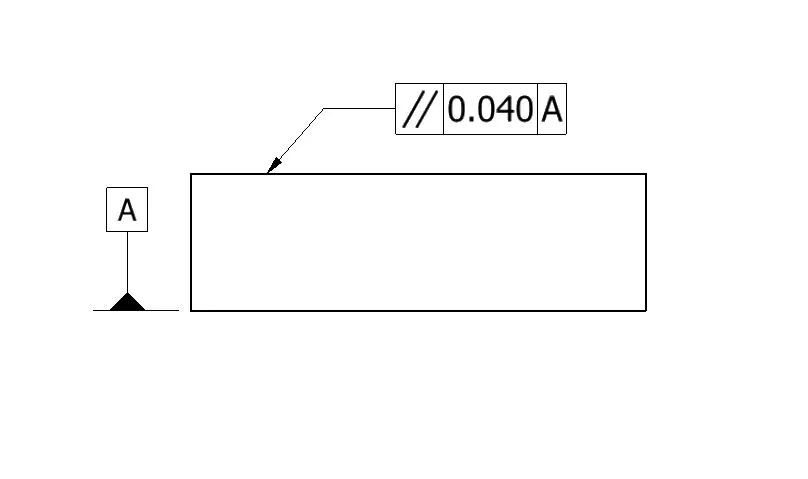
Parallelism symbol in GD&T
Most machined parts have at least one pair of surfaces that need to be parallel to each other. A machined flange that must seat against a mating component is a straightforward example. Other cases are less obvious. For example, a hole may need its axis parallel to a reference surface to maintain the required alignment of a shaft in the assembly.
GD&T parallelism gives you a precise way to specify that requirement. Instead of relying on a general tolerance note and hoping the machinist understands the intent, a parallelism callout defines exactly what feature is being controlled, what it's being measured against, and how much deviation is acceptable.
This guide explains GD&T parallelism using ASME Y14.5 conventions. Drawings prepared under ISO GPS standards should be interpreted according to the applicable ISO requirements.
What Is Parallelism in GD&T?
Parallelism is one of the orientation tolerances in GD&T, alongside perpendicularity and angularity. All three control the orientation of a feature relative to a datum. Each requires a datum reference to define the intended angular relationship.
What Parallelism Controls and What It Does Not
Parallelism controls how closely a surface, axis, or center plane aligns to a direction parallel to the specified datum. For a surface or derived median plane, a 0.05 mm parallelism callout defines a zone between two parallel planes 0.05 mm apart. For an axis callout preceded by a diameter symbol, such as ∥ ⌀0.05 A, the tolerance zone is a cylinder 0.05 mm in diameter. In either case, the tolerance zone is oriented parallel to the referenced datum.
Parallelism does not control the feature's size or establish its location relative to the datum. For a planar surface, the two-plane tolerance zone also limits form variation. However, if the design requires tighter flatness than the parallelism tolerance provides, a separate flatness callout is needed.
When specifying parallelism, the tolerance zone already limits the form of the controlled planar surface. Add a separate flatness callout only when the functional requirement demands tighter form control. If the surface must maintain a specific distance from the datum, use a dimensional tolerance or an appropriate profile tolerance to define that requirement.
Rule #1 in ASME Y14.5 establishes a boundary of perfect form at Maximum Material Condition (MMC) for applicable features of size. It does not replace a parallelism tolerance, which controls the orientation of a feature relative to a specified datum. Both requirements may apply to the same feature when the design requires independent control of size, form, and orientation.
Here's a guide to flatness in GD&T that explains how to control surface form independently of a datum reference.
How to Read a Parallelism Symbol on an Engineering Drawing
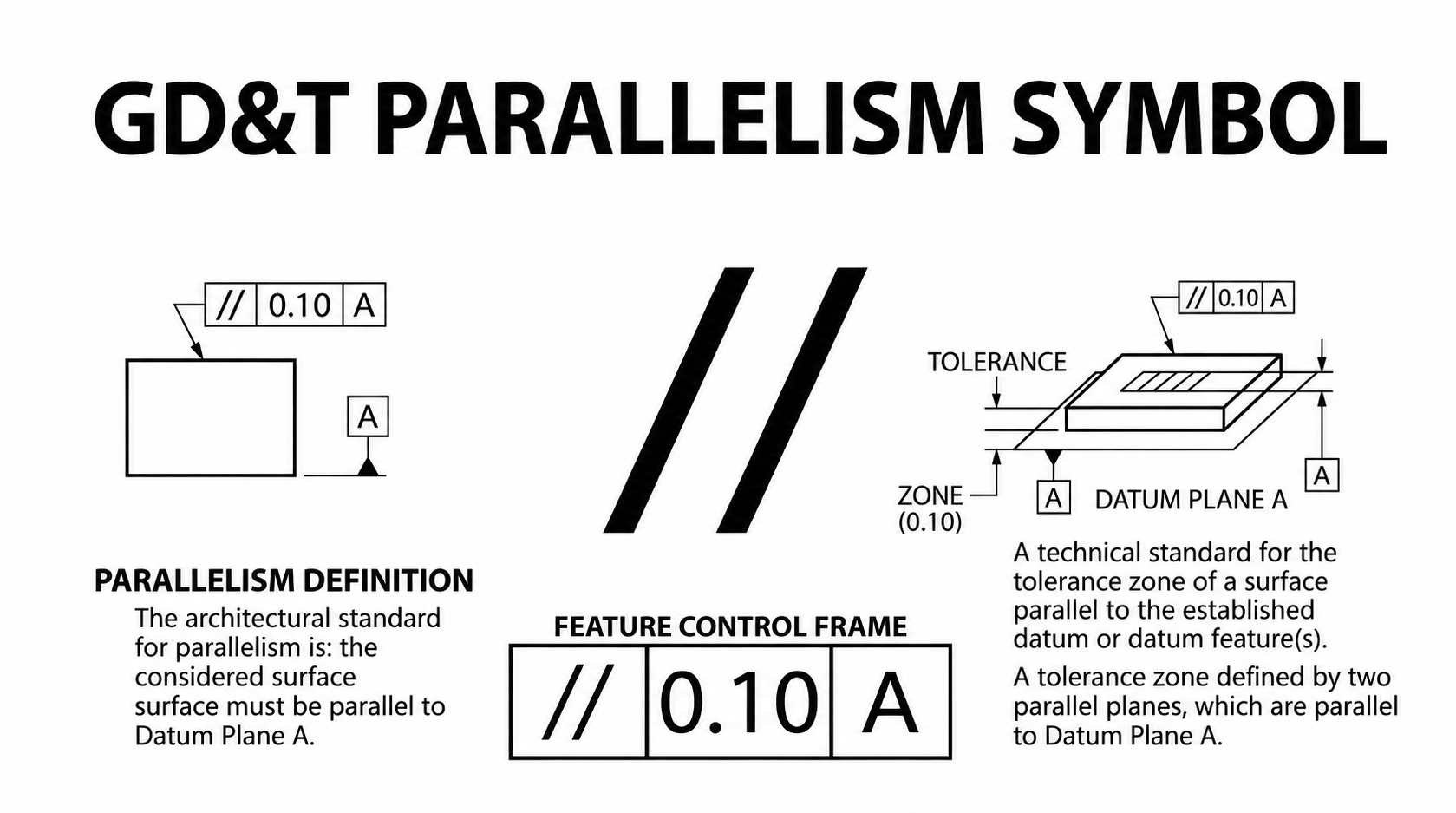
Parallelism symbol on an engineering drawing
The parallelism symbol ∥ is two parallel diagonal lines, like a pair of slashes, placed in the first compartment of the feature control frame. It looks like this in sequence:
- Compartment 1: parallelism symbol (two parallel lines)
- Compartment 2: tolerance value (for example, 0.05)
- Compartment 3: datum reference letter (for example, A)
An axis parallelism callout might read ∥ ⌀0.05 A, meaning the derived axis must lie within a cylindrical tolerance zone with a diameter of 0.05 mm, oriented parallel to Datum A.
Reading the Tolerance Value and Datum Reference
The tolerance value is the width of the tolerance zone in the unit system used on the drawing. A value of 0.05 in a metric drawing means 0.05 mm. When a diameter symbol (⌀) precedes the tolerance value, the tolerance zone is cylindrical rather than two parallel planes. This notation is used for axis parallelism.
The datum reference letter tells you what the controlled feature is being measured relative to. Datum A is most commonly a primary reference surface, a flat face that the part sits on during inspection. The parallelism tolerance is only meaningful in relation to that datum. Without it, "parallel" has no definition.
Identifying the Controlled Feature
The feature control frame connects to the feature it controls via a leader line or by attachment to the feature's dimension line. When the leader points directly to a surface, that surface is being controlled. When it attaches to a dimension line for a hole diameter, the axis of that hole is the controlled feature.
This placement is important to read carefully. A callout attached to the top face of a block controls the top face. The same callout attached to the diameter dimension of a hole controls the hole's axis. Same symbol, very different physical meaning.
A parallelism callout on a CNC drawing can affect how a part is set up and machined. If your design requires controlled parallelism between machined surfaces or bore axes, JLCCNC can review your drawings and assess the machining requirements before production.

Precision CNC Machining Service
Upload your CAD files to get an instant CNC machining quote and DFM feedback from JLCCNC engineers.
How Does the Parallelism Tolerance Zone Work?
Surface Parallelism: Two-Plane Tolerance Zone
For a surface parallelism callout, the tolerance zone is two parallel planes separated by the tolerance value. Both planes are oriented perfectly parallel to the datum. Every point on the controlled surface must fall within that zone.
Unlike a position tolerance zone, the parallelism tolerance zone is not fixed at a theoretically exact distance from the datum. It can translate along the direction normal to the datum, provided the entire controlled surface remains between the two parallel boundary planes. For example, a surface located 50.2 mm above the datum may still meet a 0.05 mm parallelism tolerance if its entire measured area fits within a pair of parallel planes separated by 0.05 mm. Its actual height is controlled separately by a dimensional tolerance.
This is the fundamental distinction between parallelism and position. Position would also fix the zone at a specific location relative to the datum. Parallelism leaves the location free and only controls orientation.
Axis and Center-Plane Parallelism
When parallelism is applied to a hole or shaft axis, a diameter symbol (⌀) before the tolerance value specifies a cylindrical tolerance zone. The cylinder is oriented parallel to the referenced datum plane or datum axis, as applicable. The entire derived axis of the controlled feature must remain within this zone.
Without the diameter symbol, the tolerance zone consists of two parallel planes, limiting the axis deviation in one direction. A cylindrical zone controls the axis in all radial directions simultaneously. The choice depends on the functional requirement and the direction in which misalignment must be restricted.
For a feature like a slot, the center plane parallelism zone is two parallel planes separated by the tolerance, oriented parallel to the datum. Every point on the derived center plane of the slot must fall within that zone.
GD&T Parallelism Examples in Engineering Drawings
Surface Parallelism Between Two Machined Faces
A typical example: a rectangular block has its bottom face designated as Datum A. The top face has a parallelism callout of 0.03mm to Datum A.
During inspection, the block is placed on a surface plate with Datum A seated against the plate. A dial indicator is used to sweep the controlled top face along multiple paths. The difference between the maximum and minimum readings across the measured area represents the parallelism variation under this setup. If the measured variation is 0.012 mm, the surface meets the 0.03 mm requirement under this inspection method. A measured variation of 0.04 mm exceeds the specified tolerance.
Note that this says nothing about the overall height of the block. The height is controlled by a dimensional tolerance separately. The parallelism callout controls only how level the top face is relative to the bottom.
Axis Parallelism for a Hole or Shaft
A more involved example: a cast housing has a primary mounting face as Datum A. A bore in the housing has a parallelism callout of ⌀0.05 to Datum A, controlling the axis of the bore.
In this application, a shaft will be inserted through the bore and must run parallel to the mounting face for the mechanism to function correctly. The ⌀0.05 tolerance means the derived axis of the bore must lie within a cylindrical zone with a diameter of 0.05 mm. The zone axis is oriented parallel to Datum A, which is the reference plane in this example.
During CMM inspection, the bore is probed at multiple cross-sections to establish its derived axis. The software evaluates whether the entire derived axis fits within a cylindrical tolerance zone with a diameter of 0.05 mm, oriented parallel to Datum A. The bore passes when the required zone does not exceed the specified tolerance.
How to Measure Parallelism
Surface Plate and Dial Indicator
This is the most accessible method and works well for planar surface parallelism on parts with a reasonably flat datum face.
Clean the part and measuring surfaces before inspection. Place the part on a precision surface plate with the datum face seated against it. The surface plate acts as a simulated datum plane, established through contact with the datum feature. Set a dial indicator on a height gauge or stand and sweep the controlled surface along multiple paths. Record the maximum and minimum readings to determine the measured height variation relative to the established datum.
Measurement accuracy depends on the datum face condition, surface plate accuracy, and contact stability. Significant form error on the datum face can change how the part seats against the simulated datum plane, affecting the parallelism result. Inspect the datum face separately when its flatness is critical to establishing a reliable reference.
Quick Formula
For a basic dial indicator check, the measured height variation can be calculated as:
Parallelism variation = Maximum indicator reading − Minimum indicator reading
This calculation applies to the measured surface under the established datum setup. It does not replace the full tolerance-zone evaluation required by the drawing.
Measuring Parallelism with a CMM
A CMM measures parallelism by probing the datum feature and the controlled feature, establishing the datum reference, and evaluating the measured geometry against the specified parallelism tolerance zone.
For surface parallelism, the CMM probes the datum surface to establish the datum plane, then measures the controlled surface across its specified extent. The software evaluates the smallest separation between two parallel planes oriented parallel to the datum that contain the measured surface points. The feature passes when this separation does not exceed the specified tolerance.
For axis parallelism of a bore, the CMM probes multiple cross-sections along the bore to establish its derived axis. The software evaluates this axis against a cylindrical tolerance zone oriented parallel to the datum. The diameter of the required zone is compared with the specified ⌀ tolerance value.
CMM inspection can evaluate complex surfaces and bore axes that are difficult to assess with a surface plate and dial indicator. Its results depend on the probing strategy and geometric evaluation method, particularly when the measured feature has significant form variation.
Parallelism vs Flatness, Perpendicularity, and Position Tolerance
The most common confusion is between parallelism and flatness. Flatness is a form tolerance that evaluates whether a surface is flat without reference to a datum. Parallelism is an orientation tolerance that evaluates whether a surface is parallel to a specified datum. A surface can be perfectly flat but not parallel to the datum. Conversely, a surface may meet its parallelism tolerance while having more form variation than the design permits. In that case, a separate flatness tolerance with a tighter value is needed.
Perpendicularity controls a surface, axis, or center plane at 90° to a specified datum. Like parallelism, it uses a datum-referenced tolerance zone, but the zone is oriented perpendicular rather than parallel to the datum. Use perpendicularity when the design requires a right-angle relationship.
Position differs from parallelism in that position controls both location and orientation simultaneously. A position callout on a hole axis constrains the axis within a cylindrical tolerance zone located at a theoretically exact position relative to the datum reference frame. The zone controls both the location and orientation of the axis. Parallelism only controls direction. If a hole must be parallel to a datum but its location is controlled separately by a dimensional tolerance, parallelism is appropriate. If both location and orientation need to be tightly controlled together, position is often the more efficient callout.
| Control | Datum Required | What It Controls | Tolerance Zone | Controls Location? |
|---|---|---|---|---|
| Parallelism | Yes | Orientation parallel to datum | Two parallel planes or cylinder | No |
| Flatness | No | Form of a single surface | Two parallel planes (floating) | No |
| Perpendicularity | Yes | Orientation at 90° to datum | Two parallel planes or cylinder | No |
| Angularity | Yes | Orientation at specified angle to datum | Two parallel planes or cylinder | No |
| Position | Yes | Location and orientation of feature | Cylindrical or two parallel planes | Yes |
How to Apply Parallelism in Design
When Parallelism Is Functionally Necessary
The functional test for specifying parallelism: will the assembly or mechanism fail, bind, leak, or underperform if the parallelism deviation exceeds a specific amount? If yes, specify it. If the general title block tolerance on the dimension controls orientation adequately for the function, a separate parallelism callout may be redundant.
Common applications include mating flange faces where angular misalignment can affect gasket compression, guide rail mounting surfaces where non-parallelism tilts the guided axis, shaft bore axes that must remain parallel to prevent bearing misalignment, and clamping fixture surfaces that need consistent contact with the workpiece.
Selecting the Datum and Parallelism Tolerance
The datum should represent the feature that establishes the part's functional orientation in the assembly. This may be the mounting face that contacts another component or the bore that locates a reference shaft. The inspection process physically contacts or probes the datum, so it needs to be a real, accessible surface that can be established cleanly.
The tolerance value should come from the functional analysis: what maximum deviation is acceptable before the part's performance is compromised? For a sealing flange, the maximum parallelism deviation might be limited by the gasket's ability to conform to the surface variation under bolt load. For a bearing housing bore, it might come from the bearing's permissible misalignment tolerance. Working backward from the function gives a tolerance that is as loose as the design allows, which reduces cost and rejection risk.
How Machining Setup and Part Geometry Affect Parallelism
Parallelism results are directly affected by how the part is fixtured during machining. A surface machined in one setup is generated relative to the machine spindle and the established setup datum. Its parallelism to the drawing datum depends on how accurately that datum is established and aligned during machining. When the part is repositioned, errors in locating and aligning the part can introduce additional parallelism deviation.
On a CNC machining center, face milling generates a surface perpendicular to the spindle axis. To machine a surface parallel to the drawing datum, the setup must orient the datum plane perpendicular to the spindle axis. Parallelism errors can occur when multiple faces are machined in separate setups, particularly if datum transfer is not properly controlled. Long or thin parts also require attention because clamping and cutting forces can deform the workpiece.
Thin parts are particularly sensitive to clamping forces. If a flexible workpiece is clamped in a distorted condition, the machined surface may shift relative to the datum after unclamping as the part returns toward its free state. This can affect both flatness and parallelism, even when the machining operation itself is completed correctly.
If your CNC machined parts require tight parallelism tolerances, the datum scheme and machining setup should be reviewed before production. JLCCNC provides CNC machining services with engineering review to assess drawing requirements and manufacturing feasibility.
Precision CNC Machining Service
Upload your CAD files to get an instant CNC machining quote and DFM feedback from JLCCNC engineers.
Parallelism in GD&T FAQs
Q: Can MMC or LMC Modifiers Be Used With Parallelism?
Yes. MMC or LMC can apply to axis or center-plane parallelism for features of size, such as holes and shafts. They cannot apply to surface parallelism.
Q: What Is the Difference Between Parallelism and Runout?
Parallelism controls how parallel a surface or axis is to a datum. Runout measures how much a surface varies as the part rotates around a datum axis.
Q: Can Profile Tolerance Replace Parallelism?
Yes. A profile tolerance can control parallelism along with a surface's form and location. Use parallelism when you only need to control orientation.
Keep Learning
Parallelism in GD&T: Symbol, Tolerance & Measurement
Key Takeaways Parallelism is an orientation tolerance in GD&T that controls the orientation of a surface, axis, or derived median plane relative to a specified datum. It requires a datum reference. Unlike form tolerances such as flatness or circularity, parallelism cannot be evaluated without something to measure against. For surface parallelism, the tolerance zone consists of two parallel planes separated by the specified tolerance value. For axis parallelism, the zone may be cylindrical or defined b......
Circularity GD&T Explained
Key Takeaways Circularity controls how round each cross-section is on a cylindrical, conical, or spherical surface. Each cross-section is checked separately. Circularity doesn't control taper, axis straightness, or alignment between sections. No datum is needed because circularity controls the shape of the feature itself. The circularity tolerance zone is bounded by two concentric circles whose radial separation equals the specified tolerance. Each circular element must fit within its own zone, evalua......
Press Fit Tolerance: Interference, Charts & Design Guide
Key Takeaways A press fit is an interference fit: the shaft is larger than the hole, and elastic deformation of the mating parts after assembly creates contact pressure that generates the friction holding the joint together. Press fit interference is the difference between the shaft diameter and the hole diameter. Minimum interference uses worst-case dimensions for the smallest overlap. Maximum interference uses worst-case dimensions for the largest overlap. Press fit tolerance is selected based on re......
GD&T Datum: Definition, Types, Symbols, and Datum Reference Frame
Key Takeaways A datum in GD&T is a theoretically exact reference used to locate or orient other features on a part. It is not the physical surface itself. A datum feature is the physical feature identified on the part and used to establish a datum. The datum itself is the theoretically exact geometric reference derived from that feature. Datums become especially important when several features have to work together. A hole pattern, bearing bore, mounting face, or mating surface may need to establish t......
GD&T Runout: Definition, Symbol, Measurement & Tolerance
Key Takeaways Runout limits surface variation while a part rotates around its specified datum axis. The datum feature establishes the axis used for the runout requirement. You compare the full indicator variation during rotation with the tolerance stated on the drawing. Circular runout applies at individual circular sections of the controlled surface. Total runout evaluates the controlled surface across its specified extent. Runout is not a size tolerance, and its value is not determined by the diamet......
GD&T Perpendicularity: Definition, Tolerance & Examples
Key Takeaways Perpendicularity is an orientation control used for a feature specified at 90° to a datum. A surface callout controls the complete surface within two parallel planes set perpendicular to the referenced datum. An axis callout controls the derived axis inside the specified tolerance zone instead of controlling the physical surface directly. Perpendicularity does not establish the location of a feature. A drawing can require another geometric control when position also needs definition. Dat......